
Ride into the network
like you own it.
The network engineer's toolkit that runs on your machine. 60+ tools, every desktop OS, one price — no server, no subscription.
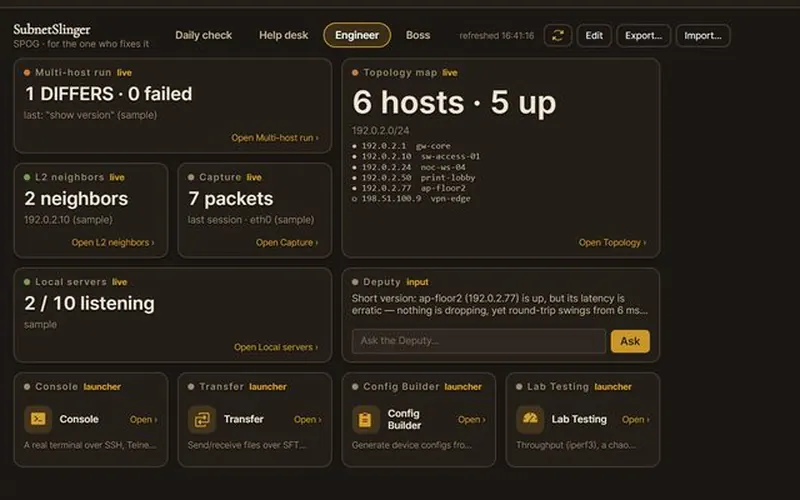 Deputy: ap-floor2 is up, but its latency is erratic — nothing is dropping.
See it running
The real app, on every desktop


Demo mode — sample data, never a real network.
Why it exists
Get to the fix — not the tool hunt.
Every network engineer knows the drill: a new laptop, and a day gone installing every tool you can remember — plus the inside-company ones. Imagine the whole toolset installed and ready to go in minutes. No more hunting.
And it never fails — you're in the field, and the one tool you need isn't there, or your local machine just can't pull the data you're after. Troubleshooting a live issue is the worst possible time to go hunting for a tool, or for access you don't have.
It should just be baked into your desktop — not a folder of PowerShell commands and scripts to remember and run. You're more than busy: your dev time goes to new builds, team software, the enterprise stack — not to building your own toolkit. You'd build this yourself some night, if you ever had the time.
So we did — every tool a network engineer actually reaches for, already on your machine, plus a modern toolset built alongside the classics. Local-first, no server, no admin to wait on. Buy it once.
What you can do with it
Troubleshoot from anywhere — a downed lab, a client site, the edge — with nothing server-side to lean on.
Server hosts, not just client tools — most toolsets are client-side only. SubnetSlinger runs the server hosts right inside the app, so you can stand up and validate those services with no live, outside-connected network.
The whole kit in one place — ping, trace, pathping, discovery, packet capture, SNMP, DNS, SSH/console, topology, drift, and more, on Windows, macOS, and Linux.
Put an AI Deputy on itWin/Linux 1.3 — run it locally with Ollama or bring your own key for Anthropic, OpenAI or Gemini — to dig through the results with you. Your models, your keys; nothing goes to an AI until you set one up and ask. Try the Deputy and Posse before you add a key: demo mode plays 15 scripted investigations on a sample network, and no AI provider is called.
Home your wayWin/Linux 1.3 — Original, Start Menu, GNOME grid, Tmux panes — or SPOG, a single pane of glass with boards for the daily check, the help desk, the engineer and the boss. Move, resize and share layouts as a small JSON file.
From finding to ticketWin/Linux 1.3 — every result has one bar: copy, save, add it to the Case you're working or the Project you're running, ask the Deputy. Jobs walk the usual checks ("Is it the network?"). The End-of-shift report hands the day over in one file, with secrets masked.
Your data stays yours — your findings stay on your machine; the macOS and Linux downloads are GPG-signed and checksummed (macOS also Apple-notarized) and Windows installs from the Microsoft Store, so you can verify it's genuine before you run it.
It keeps growing — new tools land as the wire changes, at no upgrade fee — with a direct line to the team that builds it if you need one that isn't there yet.
Try it free — nine tools free forever, no account. Everything unlocks on a 30-day trial; buy once when you're ready.
“In minutes” covers the app and its tools. Local AI models (Ollama) download and run on your own hardware, so generation can take longer on some systems.
One place to work a problem
Gather it, work it, write it down, all in one window.
SubnetSlinger is the environment you work in: pull information from many sources at once and document your way through a troubleshooting session as you go. The same goes for building out a new lab, or provisioning new gear without enterprise tools or a server to stand up.
- Gather. Run one check across many hosts at once with Multi-host run, or watch them on a SPOG board.Win/Linux 1.3
- Work it. Narrow it down with Path ping, the device page and the Deputy, which can run the read-only tools for you.
- Write it down as you go. Every result's bar adds it to the Case you're working or the Project you're building.Win/Linux 1.3
- Hand it over. The End-of-shift report puts the day in one file, with secrets masked.Win/Linux 1.3
All of it works offline. You need the internet only for an outside AI vendor, the license sign-in and check-in, and lookups whose job is the internet. How it works
Bring the host side, too
Not just a client — a rack of servers in your pocket.
Most portable toolkits are client-side only. SubnetSlinger also runs the server hosts right inside the app — so you can test and validate the services themselves, entirely offline, in a segmented or air-gapped lab where the DHCP, DNS, and AAA you'd normally reach on the company or cloud side simply aren't there.
Ten server hosts: nine built in on Windows, macOS & Linux, plus SFTP/SCP receive through your computer's own OpenSSH server (on Linux, DNS and DHCP need their real low ports). That includes AAA (RADIUS + TACACS+) on your own machine. SNMP v2c/v3 polling is its own tool.
Who it's for — small and mid-size teams, and the consultants and field techs who work across them, who can't justify a six-figure enterprise suite or a platform team to run it, but still need real tools and a way to put AI to work on their network.
The whole toolbelt, and then some
60+ tools. One toolkit.
Organized the way an engineer thinks — reachability, lookups, discovery, access, records. 47 of them below; the rest are inside.
AI & automation
4Reachability
8Lookups & web
8Discovery & layer 2
8This machine & servers
4Access & change
8Records
760+ tools on every desktop. The exact set varies by platform — some tools suit one OS better than another. New protocols added as the wire changes.
Ride any horse
Desktop. Laptop. Phone in your pocket.
For the moments you can't reach your usual network or server-side tools — provisioning new gear, troubleshooting in the field, or building out a lab. Buy the desktop once and it's yours on Windows, macOS, and Linux — every update included, no subscription. The iPhone, iPad, and Android apps are free companions, free for everyone.
Every desktop carries 60+ tools, and each version includes tools built specifically for that OS (native Wi-Fi scanning, OS connection tables, platform packet capture). The free phone and tablet companions carry a focused set of around 30.
The iPad app is free for everyone, shipped as its own platform version — not a stretched-out phone build. A cellular iPad makes an ideal field-testing rig: a big screen to actually read a capture or a topology map, with its own LTE/5G path for out-of-band checks — so you can probe and diagnose from the edge of the network without tying up your phone.
One price. One handshake.
Flat fee. Every desktop OS. All updates.
Try Pro free for 30 days — every tool, no card.
Install the free app, sign in with your email, and the trial starts.
Free forever
Nine everyday tools, yours for good:
- Ping
- Traceroute
- Path ping
- Port scanner
- DNS lookup
- Subnet calculator
- ARP table
- MAC/OUI lookup
- Discovery
Pro
A single-engineer license: one purchase, every desktop OS, every update. No subscription, no annual fee, no paid upgrades — compare to enterprise toolkits that charge yearly maintenance.
- Every tool above — packet capture, topology, drift, SNMP, console, Vault and more
- Windows, macOS & Linux — one purchase covers all three
- All updates & new major versions included
- AI Deputy & Posse — local with Ollama, or your own Anthropic, OpenAI or Gemini key; nothing sent until you set it up and ask, no markup
- Core diagnostics run locally on your machine; Pro needs a free account for licensing
- Email support from the team that builds it — usually within one business day, Pacific Time
or Buy Pro · $499 now. Need an invoice or a purchase order? Email sheriff@subnetslinger.com.
How buying works
- 1Install & open — the free app — nine tools, no account.
- 2Sign in — a free account takes about 20 seconds.
- 3Click Buy Pro — pay once, Pro unlocks on the spot.
Buying for a team? Volume & team licensing is available on request — get in touch and we'll set you up. Need your director's sign-off? Forward the one-page case.

Alex Smith · AISMITH PDX
Network, network security and software engineer for 30+ years, leading the team that builds SubnetSlinger. Every email to sheriff@subnetslinger.com is read by a person on our team. Why we built it
Direct license via Stripe, 14-day refund — see Support. The phone and tablet apps are free for everyone. Windows installs from the Microsoft Store (Microsoft-signed); macOS (notarized .dmg) and Linux (.tar.gz) are checksummed and GPG-signed with our offline key, so you can verify them before running.